If you are looking for an iPhone dual camera recorder, the obvious question is usually, “Which app should I use?”
That is the right question, but it is not the only one. The better question is, “What kind of workflow will actually help me create better content faster?”
The right app should help you reduce re-shoots, keep your framing flexible, and make repurposing easier. That is the standard this guide uses.
Start with the outcome, not the feature list
Most buyers make the mistake of comparing feature checklists before they compare the workflow.
Before you choose a recording app, decide what you actually need the app to do:
- Save time on repeated shoots.
- Make one clip usable in more than one format.
- Keep production simple enough to repeat weekly.
- Work well on the iPhone devices you already use.
If the app does not improve those outcomes, the other features matter less.
What to look for in a good dual camera workflow
A strong dual camera recording app should make these things easy:
- Capture one performance cleanly.
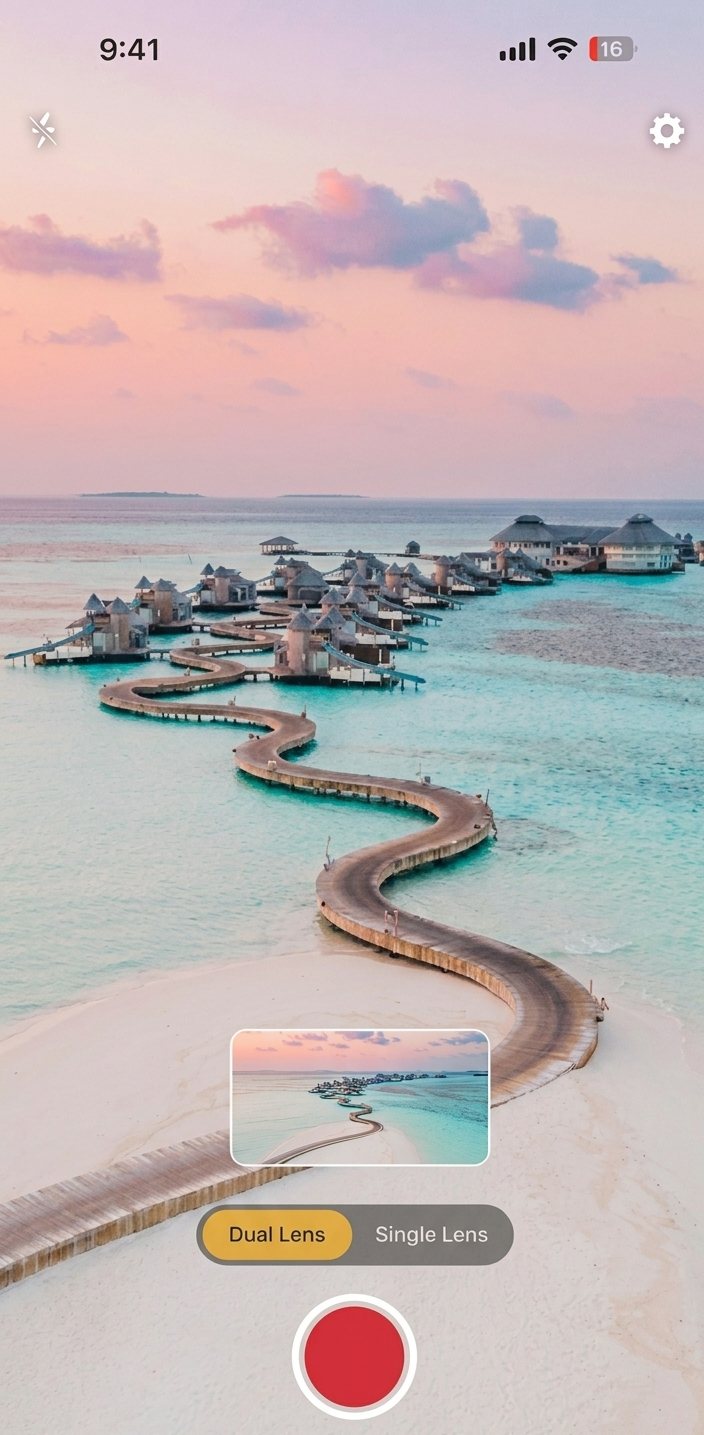
- Preserve both a vertical and horizontal version.
- Keep framing reliable enough that both outputs stay usable.
- Fit into a normal creator workflow without a lot of extra setup.
That sounds obvious, but many tools solve only one part of the problem. They may record video, but they do not help with reuse. They may support editing, but they do not help with capture. The workflow breaks down when the tool is only half the solution.
Decide how much flexibility you need
Not every creator needs the same level of control.
Ask yourself:
- Do I mainly need speed?
- Do I care more about keeping both versions?
- Am I recording talking-head content or a more complex scene?
- Will I use the footage once or reuse it several times?
If speed and reuse matter more than fine-grained camera control, DualShot is a better fit than a heavier production setup.
Why iPhone matters
For many creators, the iPhone is the actual production device.
That matters because the app has to be comfortable on the phone people really use every day. You want:
- A quick setup.
- A stable capture experience.
- A workflow that does not require extra hardware to be useful.
DualShot is built around that reality. It is meant for creators who want the iPhone to do more of the heavy lifting without turning every clip into a mini production.
Quality questions to ask before you buy
Before you choose any app, check these items:
- Does it help you preserve a good performance?
- Does it keep the output flexible enough for later editing?
- Is it easy enough to use repeatedly?
- Does it support the formats your audience actually watches?
- Does the workflow reduce rework or just move it elsewhere?
These questions are more useful than marketing claims because they map to the real work of content creation.
Who DualShot is best for
DualShot is a good fit when you:
- Create recurring video content.
- Need one recording to serve multiple platforms.
- Want to cut down on repeated takes.
- Work solo or with a small content team.
- Care about speed without giving up reuse.
It is less compelling if you only ever publish one format or if your content is so production-heavy that capture speed does not matter.
How to compare it against other options
When you compare dual camera recording tools, use the same criteria every time:
- Capture simplicity.
- Output flexibility.
- Framing reliability.
- Time savings.
- Reuse potential.
- Device fit.
That keeps you from choosing an app because of one flashy feature that does not actually change your workflow.
A simple purchase framework
If you want a practical decision rule:
- Try to describe your current workflow in one sentence.
- Identify the biggest friction point.
- Ask whether the app removes that friction.
- If it does, it is probably worth testing.
For DualShot, the friction point is usually that one take is not enough for the formats you need. The app solves that by preserving both outputs at capture time.
What not to overthink
You do not need to obsess over every technical parameter before trying the app.
What matters most is whether the workflow feels lighter after a real recording session. If it does, that is a strong signal that the app fits.
Final recommendation
If you are buying an iPhone dual camera recorder for creator work, look for speed, reuse, and consistency first. That is where the value is.
DualShot is built around that exact use case: record once, keep both outputs, and reduce the amount of duplicated work later.
Want to test the workflow first?
Open DualShot on your iPhone, record a real clip, and see whether the dual-output version saves you time in editing and publishing.