If you found this article by searching for dualshot recorder app, dual shot recorder, or dualshot recorder apk, you are probably trying to solve the same core problem: one recording session should be enough for the formats you need across social and video platforms.
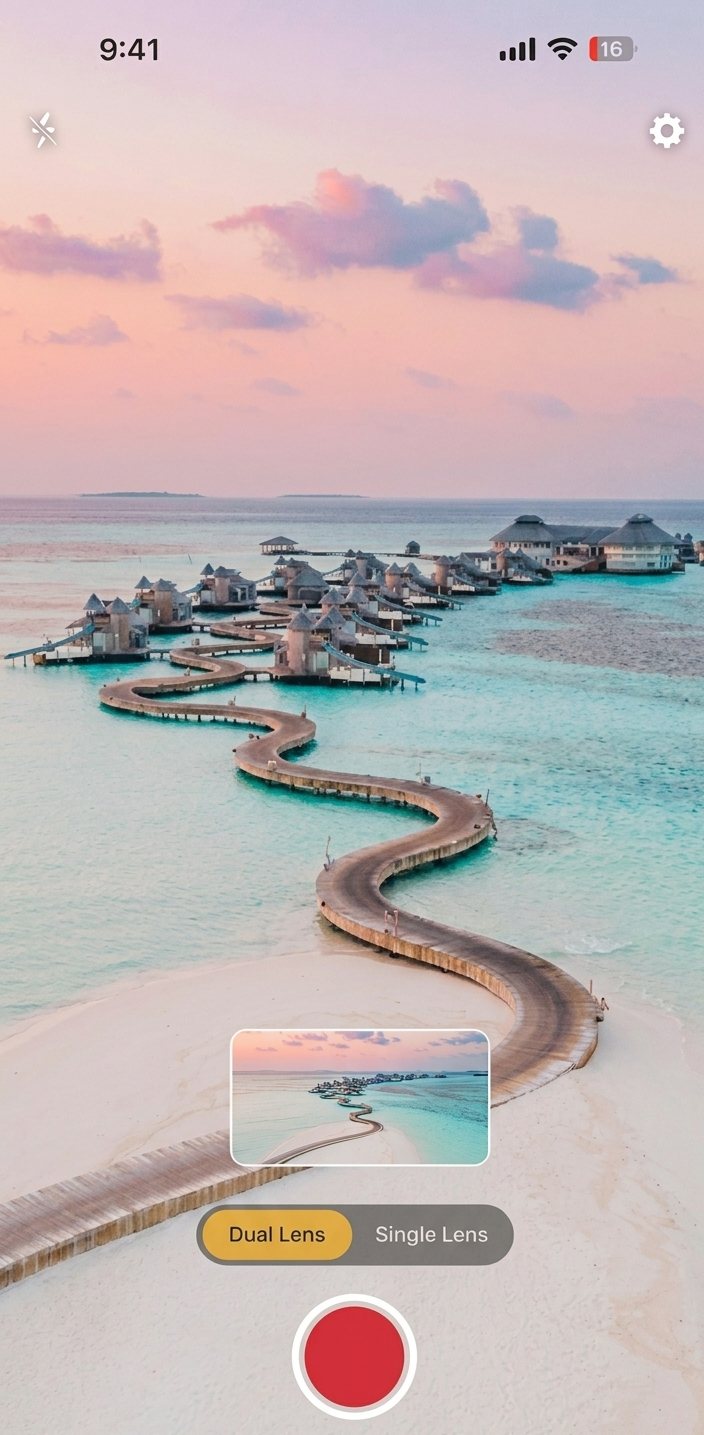
That is exactly the job DualShot Recorder is built to do. It captures portrait and landscape video at the same time on iPhone, so you do not have to choose between a vertical cut for TikTok and Reels or a horizontal version for YouTube, your website, or client delivery.
Why this app exists
Most creator workflows still start with a compromise.
You either:
- Shoot vertically and lose the framing you need for a widescreen upload later.
- Shoot horizontally and then spend time cropping, reframing, or re-recording for short-form platforms.
- Record twice, which doubles the pressure on talent, setup, lighting, and attention span.
None of those options are efficient when you are producing content regularly. They are even worse when you are operating as a small team and every extra take slows editing, approval, and publishing.
DualShot Recorder exists to remove that friction. It turns the camera moment into the source of truth for two outputs instead of one. The app is not trying to replace your editor, planner, or publishing stack. It is trying to make the capture step cleaner so everything after it gets easier.
What DualShot Recorder actually does
At a practical level, DualShot Recorder is a capture app for iPhone that lets you create:
- A portrait-friendly recording for mobile-first channels.
- A landscape-friendly recording for wider placements and reuse.
- Two synchronized files from the same performance.
- A more predictable workflow for repurposing one idea across multiple platforms.
The important detail is not just that it records two versions. It is that it reduces the number of decisions you have to make while filming. Instead of thinking, “Which format matters most today?” you can think, “What is the strongest version of this message?” and know that both outputs are being handled.
For creators, that shift matters. For teams, it matters even more because it creates a repeatable production pattern rather than a one-off workaround.
Who should use it
DualShot Recorder is most useful for people who publish the same idea in more than one format:
- Independent creators who post on TikTok, Instagram Reels, and YouTube Shorts.
- Educators who record tutorials and want both a mobile cut and a larger replayable version.
- Founders who make launch videos, product demos, and updates.
- Agencies that need a reliable capture process for client work.
- Social teams that batch-record weekly content and need a predictable output structure.
If you only publish one format, the app may still be helpful, but the value compounds when you need the same content to work in more than one place.
How the workflow looks in real life
The easiest way to understand DualShot Recorder is to look at a simple production sequence:
- Plan the message before you open the app.
- Set your camera framing so the subject sits safely in both compositions.
- Record one clean take.
- Review the two outputs.
- Add captions, intros, and platform-specific CTAs in your editor.
- Publish without re-shooting.
That sounds small, but in practice it changes a lot. It reduces repetitive capture work, shortens the feedback loop between recording and publishing, and makes it easier to batch multiple clips in one session.
If you already have a workflow, DualShot does not force you to abandon it. It sits at the top of the pipeline and makes the raw material more reusable.
Why this matters for modern publishing
Modern publishing is not about making one perfect video. It is about making one idea travel.
The same insight often needs to exist in several forms:
- A short vertical hook for mobile audiences.
- A horizontal version for a website embed or long-form reuse.
- A clipped segment for a team update or demo.
- A captioned variant for accessibility and social sharing.
The problem is that most tools force you to choose a single format too early. That creates unnecessary tradeoffs between speed and adaptability.
DualShot Recorder gives you a better default: capture once, keep both options, decide later.
What makes it different from filming twice
Filming twice seems harmless until you look at the hidden cost.
It doubles:
- Setup time.
- Talent energy.
- The risk of slight differences between takes.
- The amount of footage you need to organize.
- The chance that one format gets neglected.
It also introduces a subtle quality problem. Two separate takes often feel slightly different, even when they are technically fine. For creators who care about consistency, that can make the finished result feel less cohesive.
DualShot Recorder helps you keep one performance intact while still giving you both output shapes. That matters most when your content depends on tone, timing, or delivery. The same joke, explanation, or demo usually works best when it stays emotionally consistent across channels.
Where the Android APK conversation fits
Some visitors land here because they are looking for dualshot recorder apk or dual shot recorder apk.
The current status is simple: Android is coming soon, and the official APK will only be shared through the DualShot site and official release channels when it is ready. Until then, the iPhone app is the live product.
That is also why it is important to keep the messaging clear. People searching for APKs are often looking for a real release, not a random mirror. Clear status pages help avoid confusion and reduce the chance that someone installs an unsafe copy from the wrong source.
How to fit DualShot into a bigger content system
If you publish often, the capture app is only one part of the system. A healthy workflow usually looks like this:
- Capture with DualShot Recorder.
- Trim, caption, and brand in your editing app.
- Export with separate titles or descriptions for each platform.
- Track which formats get the best retention and engagement.
- Reuse the strongest structure in future shoots.
This is where the app becomes more than a utility. It becomes part of a repeatable content engine. The better the capture step, the less cleanup the rest of the team has to do.
A simple checklist before you record
Before you press record, make sure you have these basics covered:
- A single clear idea for the clip.
- Enough room around the subject for both vertical and horizontal framing.
- Stable light.
- Clean audio.
- A CTA that makes sense for the platform.
If you can answer those five things before filming, the post-production phase usually becomes much easier.
When DualShot is the wrong tool
Not every recording needs a dual-output workflow.
If you are creating highly cinematic footage that will be heavily edited later, or if the final destination is only one platform, then a simpler setup may be enough. The app shines when speed, reuse, and cross-platform publishing matter more than elaborate camera control.
That is a good tradeoff for most creator teams because the biggest bottleneck is not advanced cinematography. It is time.
What to do next
If your current process still requires you to shoot twice for two different formats, the app is trying to give you that time back.
Start with one use case:
- A talking-head announcement.
- A product teaser.
- A quick tutorial.
- A short founder update.
Then test whether one capture session really is enough for both outputs. In most creator workflows, that simple change is where the time savings start to show up.
Try it in the app
If you want to move from reading to shipping, the fastest next step is to try the workflow in DualShot Recorder on iPhone.
The app is built for people who want to publish faster without re-shooting their content.
Ready to see the workflow in practice?
Download the app, record one take, and compare how the two outputs feel in your own editing stack.